Frequently Asked Questions
Find quick answers to common questions about Nitroflare.
Premium Account
The download is locked. How can I unlock it?
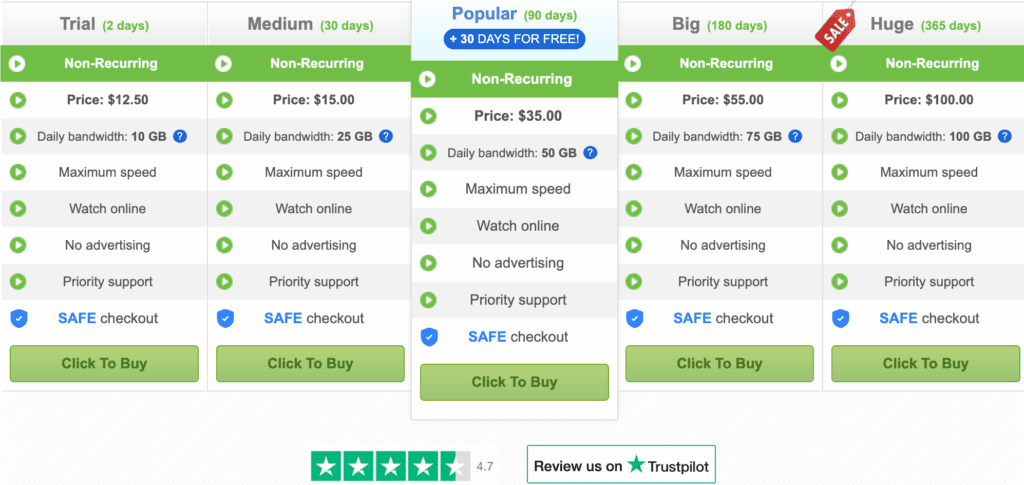
To unlock your download, you need to buy a premium account.
Premium users get instant access to all downloads with no locks or waiting time. You can start downloading right away after you upgrade.
I bought premium access. How do I download now?
After buying premium, follow these simple steps:
- Go to the Nitroflare website
- Click the login button at the top
- Enter your email address
- Type the password from your registration email
- Click login and start downloading
Your premium account gives you instant access. No more waiting or captcha codes!
How long do my files stay online?
File storage time depends on your account type:
- Free Users: Files are deleted 7 days after the last download
- Registered Users: Files stay for 45 days after the last download
- Premium Users: Files remain for 90 days after the last download
Premium users get the longest storage time. Your files stay safe much longer.
Can I share my premium account with friends?
No, account sharing is strictly forbidden.
Each premium account is for one person only. Sharing your account can cause:
- Account suspension or ban
- Loss of all premium benefits
- No refund of your payment
This rule helps keep the service fast and reliable for all users.
Downloads
Does Nitroflare support jDownloader?
Yes! Nitroflare works perfectly with jDownloader 2 (the newest version).
To use jDownloader with your premium account:
- Open jDownloader 2 on your computer
- Go to Settings and then Account Manager
- Click “Add” and select Nitroflare
- Enter your email and password
- Save and start downloading at full speed
This makes downloading multiple files much easier and faster.
Why is my download slow?
Free users have limited download speed. This is normal.
To get faster downloads:
- Upgrade to a premium account for full speed
- Premium users get unlimited bandwidth
- No speed limits or throttling
- Downloads finish much faster
Can I resume a download if it stops?
Yes, but only for premium users.
Premium accounts include resume support:
- Lost internet connection? No problem
- Download starts where it stopped
- No need to start over from the beginning
- Works with download managers like jDownloader
Free users cannot resume downloads. They must start from the beginning each time.
Uploads
What upload methods do you have?
Nitroflare offers three easy ways to upload files:
- Computer Upload: Click to select files from your computer. Simple and fast.
- Remote Upload: Use a URL to upload from another website. Great for transferring files.
- FTP Upload: For advanced users. Upload many files at once. Fast and reliable.
Pick the method that works best for your needs.
What files can I upload?
You can upload most types of files:
- Videos and movies
- Audio files and music
- Images and photos
- Documents and PDFs
- Software and applications
- Archives (ZIP, RAR, etc.)
NOT Allowed:
- Copyrighted material you don’t own
- Offensive or illegal content
Breaking these rules will result in account closure.
Can I delete a file I uploaded?
Yes! You can delete files easily.
When you upload a file, we give you a Delete Link. Save this link!
To delete your file:
- Click on your Delete Link
- Confirm you want to delete
- The file is removed right away
Important: If you lose the Delete Link, you cannot delete the file manually. It will only be removed after the storage time expires.
Is my data safe and private?
Yes! Your files are very safe with Nitroflare.
- All uploaded data is encrypted
- No one can see your files without your link
- We never share your files with others
- Your privacy is our top priority
- Secure servers protect your data
You control who can access your files. Only people with your download link can get them.
Earnings & Affiliate
How can I earn money with Nitroflare?
You can make money through our affiliate program!
Here’s how it works:
- Upload your files to Nitroflare
- Share the download links with others
- Earn money when people download your files
- Get a percentage when someone buys premium through your links
Important: You must be logged in when uploading. This lets us track your files and pay you correctly.
Popular files can earn you good money. The more downloads, the more you earn!
Does it cost money to be an affiliate?
No, it’s completely free!
You can:
- Register for free
- Upload files at no cost
- Start earning money right away
- Get paid from downloads
- Earn from premium sales
There are no hidden fees or charges. Just sign up and start uploading to make money!
When and how do I get paid?
Payment details:
- You can request payment when you reach the minimum amount
- Check your account dashboard for your balance
- Choose from several payment methods
- Payments are usually processed within a few days
Log into your account to see detailed statistics about your earnings and downloads.
Payments
What payment methods do you accept?
We accept many safe payment options:
- Credit Card – Visa, Mastercard, and more
- PayPal – Fast and secure
- Crypto – Bitcoin and other coins
- Gift Cards – Easy and convenient
- PaySafeCard – Safe prepaid option
- Sofort Banking – Direct bank transfer
- Perfect Money – Digital currency
All payments are encrypted and secure. Your payment info is safe with us.
Is my payment secure?
Yes! We use the best security for all payments.
- All payments are encrypted with SSL
- We never store your full card details
- Trusted payment processors handle transactions
- Your financial info is completely safe
Millions of users trust Nitroflare with their payments every day.
Still Need Help?
Can’t find what you’re looking for? Try our premium service risk-free!


